
Reviewed against the English K–10 Syllabus (2022), the NSW Department of Education instructional sequences, and the NSW screen time guidelines announced 13 September 2026. Last reviewed: October 2026.
If you teach in a NSW primary school, keyboarding is not an optional extra you fit in if there’s time. It is assessable syllabus content, with specific expectations at every stage from Year 1.
Since September 2026 it is also something you have to deliver inside a capped screen time budget — which sounds like a squeeze, but turns out to be two halves of the same finding.
This page sets out what the syllabus requires, what the Department’s instructional sequences recommend in practice, what the new screen time guidelines change, and why the cognitive science says keyboarding is the screen use best placed to survive the cap.

Keyboarding sits in the Handwriting focus area (K–2) and Handwriting and digital transcription(Years 3–6). Handwriting is not replaced.
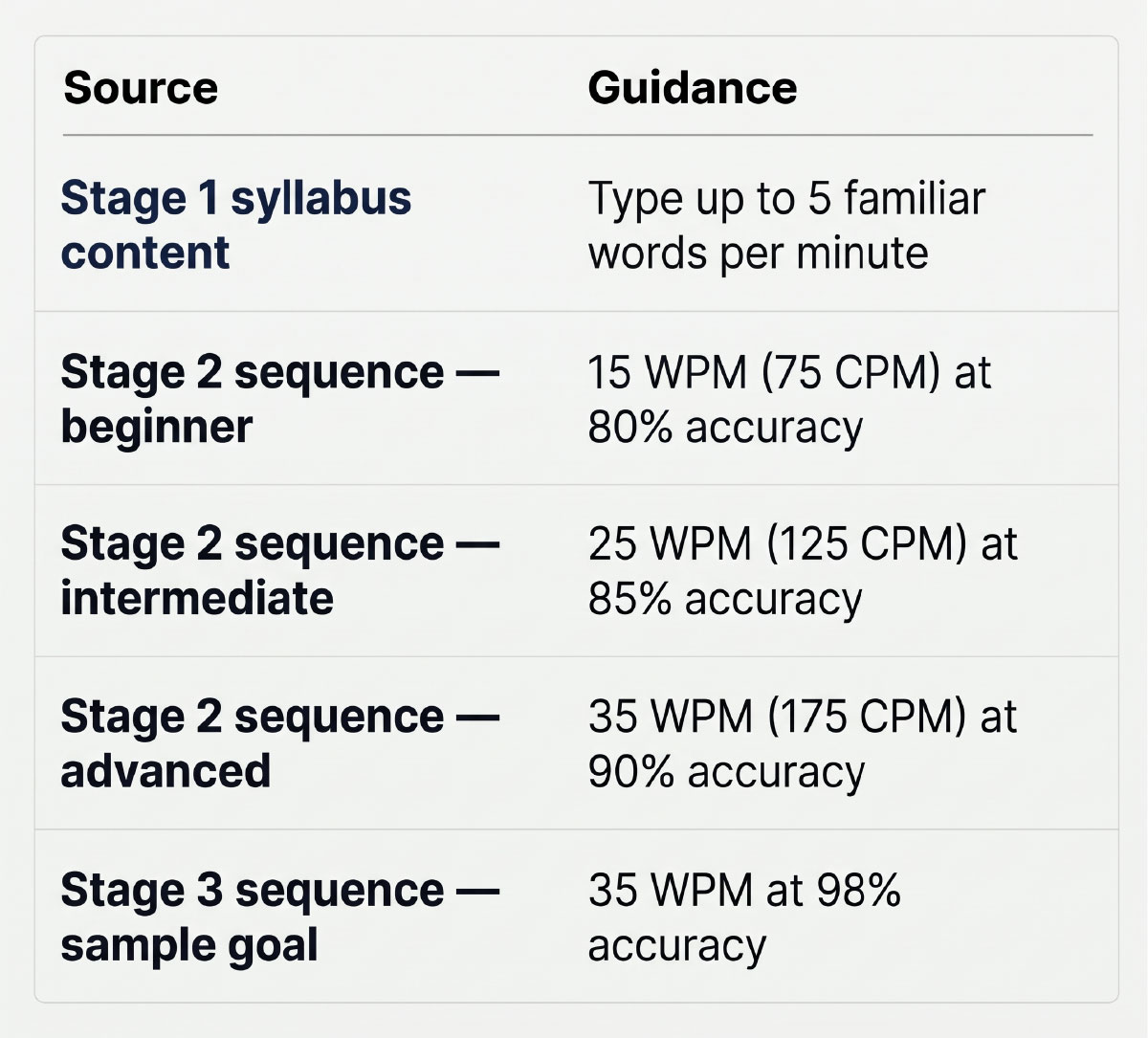
No NESA-mandated words-per-minute standard exists, but Stage 1 content specifies “type up to 5 familiar words per minute”, and the Department’s sequences give goal bands of 15, 25 and 35 WPM, with accuracy valued over speed.
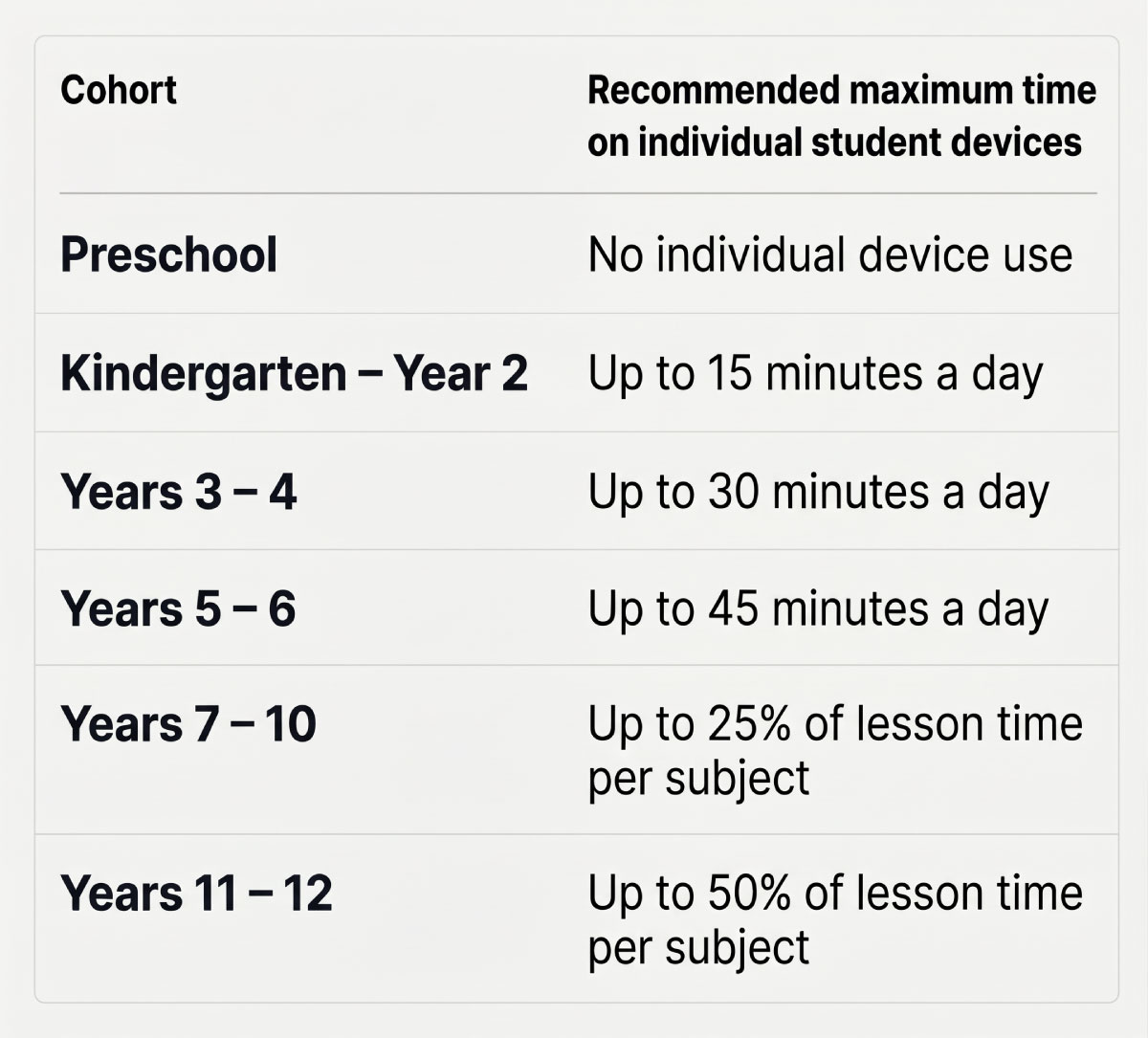
From Term 1 2027 (recommended; mandatory 2028), device maximums are 15 min/day K–2, 30 min/day Years 3–4, 45 min/day Years 5–6, averaged across the week.
Both policies rest on the same cognitive science: working memory is small, and anything not yet automatic consumes it.
The English K–10 Syllabus (2022) replaced the 2012 syllabus, with K–2 implemented from 2023 and Years 3–6 from 2024. If your programming documents still cite codes beginning ENe-, EN1-, EN2- or EN3-, they are two to three years out of date.
Here is what the current syllabus says about keyboarding.
Note the word automatic in the Stage 1 handwriting outcome. The syllabus is using the automaticity construct explicitly — and it applies to keyboarding for the same reason it applies to handwriting. That becomes important later.
Handwriting outcomes also run at every stage (ENE-HANDW-01, EN1-HANDW-01, EN2-HANDW-01, EN3-HANDW-01). Digital transcription is an addition, not a replacement.
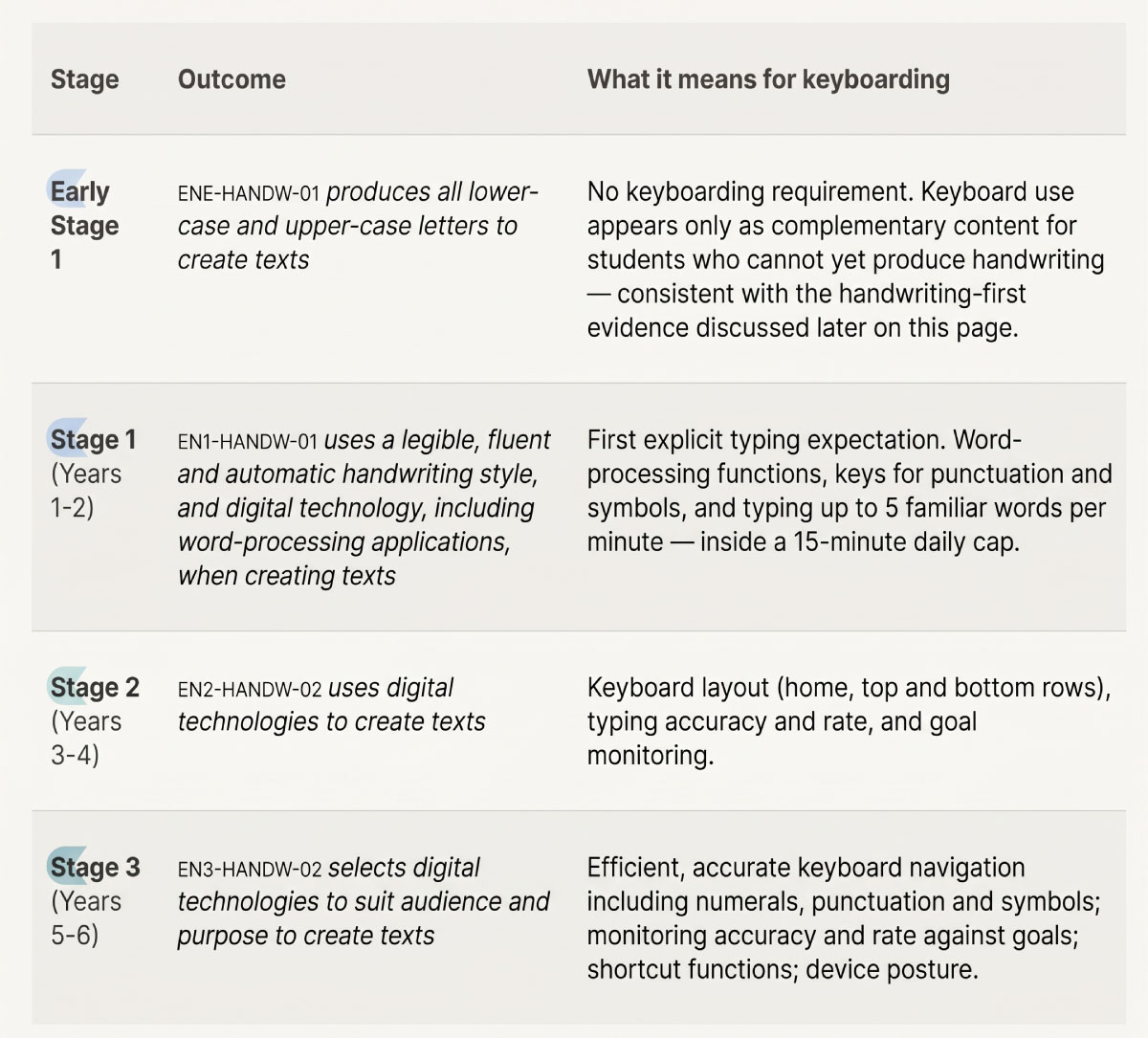
EN1-HANDW-01 content relevant to keyboarding:
Five words per minute is slow by adult standards and reasonable for a six- or seven-year-old. The point is finger-to-key mapping and confidence — the accuracy stage of skill acquisition. Don’t push for speed here; push for not looking at the hands.
EN2-HANDW-02 content relevant to keyboarding:
The Department’s English Stage 2 – Instructional sequence – Handwriting and digital transcription sets out a progression you can follow almost directly:
It recommends at least 3 explicit teaching sessions per week, delivered as short, sharp lessons of 15–20 minutescovering handwriting and keyboarding together, and for typing specifically 2–3 × 10-minute sessions per week. Tracking sheets recording initial WPM, long-term goals and weekly or fortnightly progress are suggested.
EN3-HANDW-02 content relevant to keyboarding:
Three things change in Stage 3. Numerals, punctuation and symbols are named explicitly — a program that only drills letters leaves a gap. Students are expected to set and monitor their own goals, which means your program needs to surface accuracy and rate data to students, not just to you. And the outcome is about selecting tools for audience and purpose — which presupposes students have enough fluency to make a genuine choice between paper and keyboard.
The Stage 3 sequence also suggests short breaks every 20–25 minutes and attention to screen height, glare and external keyboards.
NESA sets no mandated WPM standard in the outcomes or achievement standards. The figures NSW schools actually use come from the Department’s instructional sequences:
Both sequences stress that accuracy is valued over speed. The Stage 3 sequence notes that online typing programs can provide the WPM and accuracy data used for baseline testing and goal tracking.
Because these are sample goals and bands rather than mandated standards, your school sets its own targets. Treat the table as a starting point for a faculty discussion, not a compliance checklist.
A workable assessment routine
So far this is a story about curriculum. But from 2027 there is a second constraint on the same classroom minutes.
The NSW Government announced new screen time guidelines on 13 September 2026. They are recommended from Day 1, Term 1 2027 and mandatory from Term 1 2028, with 2027 treated as a transition year.
These maximums apply on average over a week, not as a strict daily stopwatch. The guidelines also: