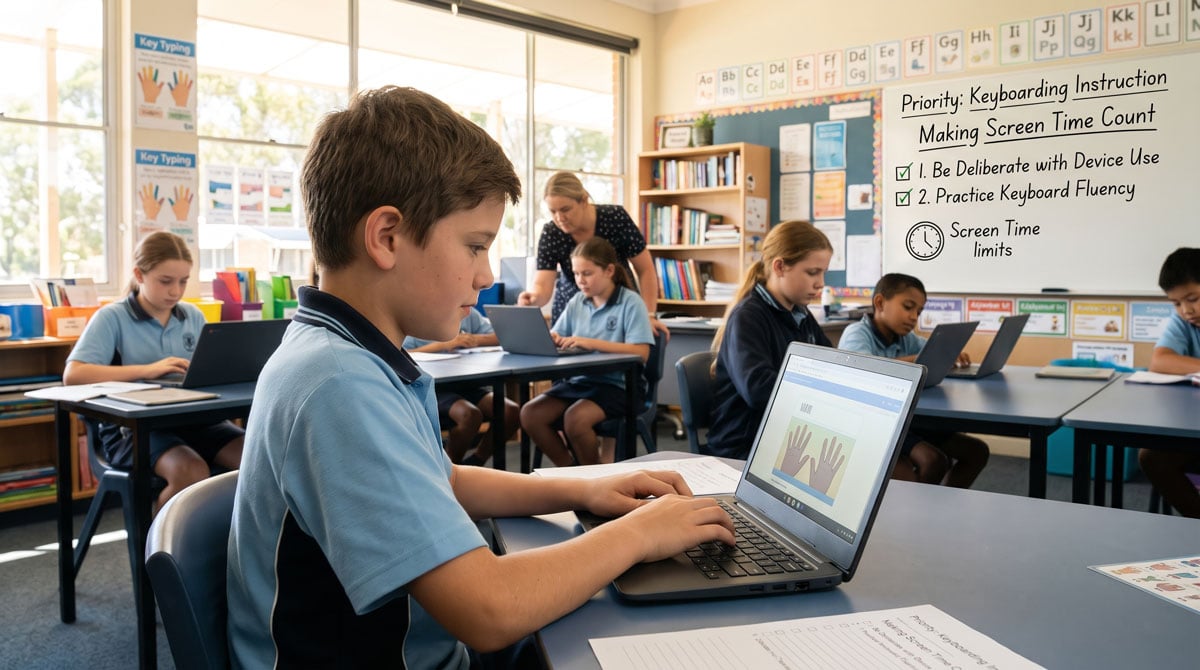
While recent educational reforms and state policy shifts properly emphasize reducing undirected or low-value screen time in Australian classrooms, schools must not abandon explicit keyboarding instruction. Emerging curriculum requirements and empirical evidence demonstrate that touch-typing fluency is a vital, constrained skill that must be systematically taught to support student literacy, reduce cognitive load, and ensure success in online assessments.
The Dual Imperative: Education systems are moving to curb undirected, low-value screen time, but this reduction must be paired with purposeful, explicit keyboarding instruction rather than complete digital abandonment.
State Screen-Time Policies: Jurisdictions across Australia are implementing a patchwork of guidelines and daily caps (such as Victoria’s primary limits and NSW’s staged maximums), highlighting a growing shift toward intentional device use.
Keyboarding as a Constrained Skill: ACARA literacy progressions track keyboarding to automaticity, classifying it as a “constrained skill” that, once mastered through deliberate practice, permanently terminates its demand on instructional time.
Cognitive Load and Working Memory: Unmonitored “hunt-and-peck” typing overloads working memory and slows down student output, whereas touch-typing fluency frees up cognitive bandwidth for high-level writing composition and ideation.
The NAPLAN Performance Advantage: Research across 99 Australian schools using Typing Tournament showed that students achieving functional touch-typing fluency ($\ge 18$ WPM) gained a statistically significant +7.1 mark advantage on the NAPLAN Online Writing Task.
The Need for Proper Tools and Supervision: Because students do not pick up touch typing naturally, schools require ST4S-approved, ad-free, purpose-built instructional platforms (such as Typing Tournament) backed by direct teacher supervision of technique, posture, and finger placement.
Research says cut screen time but not typing instruction
Two conclusions now shape Australian classroom practice, and both rest on research rather than preference: unnecessary screen use should be reduced, and keyboarding including touch typing should be taught explicitly and systematically.
Neither is a matter of opinion, and neither is optional in the way teachers sometimes assume. Curriculum and assessment expectations require students to compose on keyboards. The evidence says the reduction of screen time is warranted, and at the same time the evidence says fluent keyboarding has to be taught both to build literacy skills and for employment and assessment purposes.
The mistake would be to treat the first as a reason to abandon the second. Cut the screen time that builds nothing. Protect and intensify the screen time that builds a mandated skill.
With reduced screen time keyboarding fluencynow sits at the top of the priority list.
The argument for reduced screen time:
Departments are removing undirected and low-value device use — devices out by default, screens as background, screens as rewards. This is the use the research actually warns about.
Students are nonetheless required to create and edit digital texts across every Australian curriculum, and the National Literacy Learning Progression tracks keyboarding to a level requiring automaticity.
Automaticity is a taught outcome, not a by-product of exposure. Students who are simply given laptops develop hunt-and-peck, and it plateaus.
Therefore the reduced screen time must be allocated deliberately, with explicit keyboarding instruction scheduled into it — not left to whatever minutes survive.
What follows sets out the evidence for the reduction in screen time and the concurrent need for typing fluency.
Where screen-time guidance is up to across Australia
As at October 2026 this is a patchwork, not a national policy—but the direction of travel is consistent:
Victoria — the first mover. Minimal device use in Prep–Year 2 and up to 90 minutes a day in Years 3–6, plus planned device-free learning time in secondary schools from 2027. Advice favours printed texts as the default for early reading. (Victorian announcement; digital learning guidance)
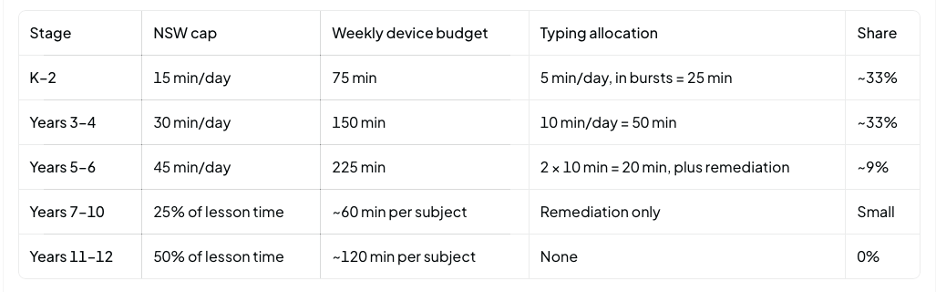
NSW — the most prescriptive, and explicitly research-funded. Recommended maximums for individual device use: 15 minutes a day in K–2, 30 in Years 3–4, 45 in Years 5–6, and a proportion of lesson time in secondary. Averaged across a week; recommended from Term 1 2027, with the government saying mandatory from 2028. At least an hour a day of pen-and-paper learning. (NSW guidelines)
Western Australia — piloting, not mandating. Ten public primary schools from 2027, K–2 focus. (ABC report)
Queensland, SA, Tasmania, ACT, NT — no comparable classroom caps announced. Policies differ; phone restrictions are the common ground.
Nationally — no uniform standard, and no national data on how much device time students actually spend at school.
Don’t assume a single national limit is in force. Do assume that “why is this device on?” will become a normal professional question in every jurisdiction.
The reduction is evidence-based—but the evidence is specific
The case for cutting screen time is real. It is also narrower than the headlines suggest, and teachers should know where the boundaries are:
The OECD’s 2024 analysis found widespread reported digital distraction in class. Crucially, it distinguished learning use from leisure use: moderate learning use was associated with stronger outcomes than no use, while heavier leisure use at school was associated with lower maths performance. (OECD, Managing screen time)
The OECD’s 2025 review concluded digital tools can support literacy—including writing—but only depending on how they’re used, flagging distraction and cognitive overload, and stressing the need to develop both handwriting and keyboarding. (OECD, 2025)
Meta-analytic work on reading finds a paper advantage for some kinds of comprehension, particularly expository text—supporting retained print use, not blanket bans. (Clinton, 2019)
The honest qualification: this evidence supports purposeful use and attention to distraction. It does not establish that any specific minute threshold is a proven scientific limit, nor that reducing minutes alone reverses literacy decline. The exact numbers are policy judgements. The direction is evidence-based; the decimals are not.
That cuts both ways—and it strengthens the argument for typing. If the caps aren’t magic numbers, then what happens inside the remaining time matters more, not less.
Keyboarding is a mandated outcome — and a constrained skill
The National Literacy Learning Progression includes handwriting and keyboarding as a Writing sub-element, and it tracks that skill through to automaticity. Both current curriculum versions describe the same developmental sequence; what changed is the labelling.
Version 8.4 codes the sub-element HwK, with levels HwK1–HwK8. HwK8 describes demonstrating automaticity when using keyboarding and screen functions.
Version 9.0 labels progression levels P1–P8, with P8 carrying the same indicator, in the same words.
The developmental expectation is unchanged. Only the codes moved.
Note the alignment, because it matters: in Version 9.0 the final level is aligned to Year 4 — not Years 5–6, as some earlier materials state. The expectation of automaticity lands well before the end of primary school, and well before the Year 5 NAPLAN writing test that depends on it.
There is one more classification worth knowing. ACARA describes handwriting and keyboarding as a constrained skill: one that “can be learned in a limited amount of time” and, “once achieved, requires no further teaching.” That single line settles the hardest question in this debate. Allocating protected minutes to keyboarding instruction does not permanently displace anything else — it is a bounded investment with a permanent return. Given a few years of deliberate practice, a student types automatically for the rest of their schooling, freeing those minutes for everything else. Compare that with almost any other claim on the same minutes: reading comprehension, vocabulary and writing craft are unconstrained — they keep developing and keep needing time. Keyboarding is the rare case where the investment terminates.
The states require the outcome explicitly
The national progression is not the only source of the obligation:
Victoria. Version 1.0 of the Victoria Curriculum attached fluency language to software — “growing speed and efficiency” — and retired it. Version 2.0 redistributed the journey: handwriting now carries the fluency (“legibly and with growing fluency,” Level 2), while the digital elaborations carry the destination — from Foundation’s “may include digital tools,” through Level 3’s “plan, sequence, compose and edit,” to Level 6’s “selecting and combining digital tools.” Nowhere does the new curriculum name typing, a keyboard, speed or accuracy. The elaborations specify where students must end up — composing and editing on screen — while silently assuming the keystroke fluency that gets them there. The automaticity imperative has not vanished from the documents; it has moved from the sentence to the subtext, from a thread schools followed to an inference schools must draw and defend.
NSW embeds digital composition in the English K–10 Syllabus (2022) outcomes for creating written texts, and the department’s own Handwriting and digital transcription instructional sequences for Stage 2 and Stage 3 explicitly pair handwriting instruction with keyboarding instruction, including attention to technique, accuracy and fluency.
The obligation is layered: national progression, state curriculum, and in NSW departmental teaching sequences all point the same way.
But no document specifies how to teach it
ACARA describes the progression as a resource for planning, monitoring and assessment rather than a prescriptive checklist and does not specify a teaching method; the Victorian content descriptions name software use as an outcome without prescribing instruction in technique; and NSW’s instructional sequences, while they do include explicit keyboarding guidance, are support materials rather than mandated programs, without a systematic technique or sequence to automaticity.
The neutrality is principled — outcome documents describe what develops and leave how to teachers — but it has a cost. Automaticity is named as an expectation across every layer of documentation, while the means of reaching it is stated nowhere. In that absence, keyboarding is widely treated as something students will simply pick up. That assumption is not supported by the evidence: NSW’s own assessment research found a median Year 3 typing speed of 9 words per minute — slower than the same children’s handwriting — and recommended that schools adopt an effective method for building typing fluency and monitor it over time.
They do not pick it up. Explicit touch-typing instruction is the only approach that reliably develops keyboarding automaticity across a whole cohort — and because keyboarding is a constrained skill, that instruction has a defined end point. Reach the final level, and you are done; the minutes come back. A minority of students reach functional fluency by other routes — self-taught fingering, sustained authentic keyboard use, or dictation where fine-motor or other needs make it the appropriate tool — but those routes produce uneven, incidental outcomes and leave a substantial tail of students plateaued at hunt-and-peck.
Where every layer of curriculum names automaticity as an expectation, teachers are owed a method as well as an outcome.Systematic touch-typing instruction is that method — and the progression supplies the yardstick for monitoring whether it is working.
The typing research—and why automaticity is the target
Automaticity is the technical heart of this. A student still hunting for keys is spending working memory on transcription that should be going to planning, spelling, sentence construction and revision. That is the same transcription-load problem long understood in early handwriting, transferred to a keyboard.
A study of 544 Australian Year 2 students found keyboarding automaticity uniquely related to the quality and fluency of computer-based writing. Observational—so not proof of causation. (Malpique et al., 2024)
A small Year 4 intervention found structured typing and word-processing instruction improved typing and word-processing performance, with some composition gains against a comparison group. Promising; the authors call for larger studies. (Gahshan & Weintraub, 2024)
Exploratory Grade 2 work linked automaticity to writing performance in both paper and keyboard composition. (Study)
NAPLAN’s own evidence makes the stakes plain: NSW CESE found Years 2–5 students scored lower on computer-based writing than on paper, with typing proficiency the key variable (each extra 5 WPM ≈ 7.5 scaled points), median Year 3 typing speed of just 9 WPM—slower than their handwriting—and a recommendation that schools adopt an effective method for building typing fluency and monitor it over time. (CESE)
The research does not say one commercial program is mandatory. It does say: if students must write on keyboards, transcription must be taught deliberately, practised to automaticity, and monitored. That is a teaching obligation, not a product preference.
What the evidence from schools using Typing Tournament shows
The research on keyboarding automaticity is general, and it is thin in one specific respect: the studies are small. The main Australian evidence linking keyboarding automaticity to children’s writing — Malpique and colleagues’ work — is built on 544 Year 2 students in 17 Perth schools. Related studies run to 49 students. Valuable work, but narrow: single cities, single year levels, and mostly Year 2.
That matters, because the question teachers actually face is a system-level one. Does sustained keyboarding instruction, delivered in ordinary Australian schools at scale, show up in standardised writing results? EdAlive examined that question directly. Because this article is published by EdAlive, both the findings and their limits are set out in full so you can judge them.
The study in brief:
99 Australian schools that were consistent users of Typing Tournament, where Year 5 classes had already reached class-average typing speeds of at least 18 WPM. That threshold is meaningful: peer-reviewed norms put mid-primary handwriting at roughly 10–13 WPM, with no primary-grade average reaching 20 WPM, so 18 WPM represents typing that has outpaced the writer’s own hand by the end of primary school.
Each school’s 2019 Year 5 NAPLAN Online Writing result was compared with its own “Similar Schools” average — the benchmark accounting for socio-economic advantage, sector, size and remoteness; a far fairer comparison than the national average.
Every state and territory represented: NSW (51), Qld (15), Vic (11), SA (7), WA (7), Tas (4), NT (2), ACT (2). Both sectors: 42 government schools, the balance non-government. Metropolitan through remote. Roughly 5,350 Year 5 students in total.
What it found:
Schools averaged 7.1 marks above their Similar Schools benchmark on the Year 5 Writing Task — statistically significant ($p = 0.000002$), with 69 of 99 schools at or above benchmark.
The margin was remarkably consistent. Government $+6.95$, non-government $+7.23$; metropolitan $+6.52$, non-metropolitan $+8.24$. School size made no clear difference. The benefit held across the socio-economic range.
7 marks is substantial. Against NAPLAN’s year-to-year progression it equates to roughly 1.1 to 1.6 school terms of typical writing growth — about 37% of a year’s progress.
Gains are achievable within a normal timetable. EdAlive’s program data indicates roughly 30 minutes per week for a full term is associated with an average gain of about 6 WPM, with many classes reaching 45 WPM or more by the end of primary school.
Why the breadth of this dataset matters
Most keyboarding research tells us what happens in a handful of schools in one city. This study tells us what happened across eight jurisdictions, two sectors, four remoteness categories and the full socio-economic range — because NAPLAN’s Similar Schools system supplies a benchmark that already accounts for the things that usually confound school comparisons.
The consistency is the finding. An effect that appeared only in advantaged metropolitan schools would be unremarkable — it could be explained by resourcing, parental support, staffing stability. An effect that holds at roughly the same magnitude for government and non-government schools, city and country, and from the least to the most advantaged, is much harder to explain away. That pattern is what you would expect if keyboard fluency is doing genuine work rather than standing in for privilege.
Two findings worth sitting with:
Schools above the 18 WPM threshold gained no extra NAPLAN advantage from higher speed, accuracy or typing volume. This complicates the assumption that faster is always better. The meaningful threshold appears to be fluency — enough automaticity to free attention for composition — rather than a speed race. It also suggests the 30 minutes a week is doing the work, and more is not automatically better.
ACARA’s design may be dampening the measured effect. ACARA has stated its intention that the online Writing Task assess composition independently of keyboarding ability. If that moderation works as intended, 7 marks is closer to a floor than a ceiling — and in most writing contexts through schooling, that neutralisation isn’t there. NB For many years there was a statement to this effect on the ACARA website in the NAPLAN Online Q and A section. As at October 2026 this reference has now been removed.
What this study supports:
Consistent, structured use of an explicit touch-typing program — in schools where classes reached functional fluency — was associated with meaningfully higher writing results than comparable schools.
The association held across sectors, locations and socio-economic bands.
The result is consistent with the wider research linking automaticity to computer-based writing quality.
What this study does not establish:
Causation. Schools were selected because they used Typing Tournament consistently and reached the speed threshold. Motivated leadership, strong teaching and settled practice travel with that selection. The design cannot separate the tool from the school.
The analytical sample is 99, not 5,350. Analysis was at school/cohort level; individual student data wasn’t available, as the report acknowledges. The breadth is real; the statistical power is that of 99 observations. Both things are true.
No peer review. This is EdAlive’s own research on EdAlive’s own product. The methods and limitations are disclosed rather than independently scrutinised.
A non-representative sample. The 99 schools averaged 10.9 marks above the national mean before any comparison ($p = 0.00001$), with metropolitan schools over-represented and lower socio-economic strata under-represented. The Similar Schools benchmark mitigates this substantially but doesn’t eliminate it.
Current conditions. Data is from 2019, when NAPLAN was mid-transition to online delivery — predating the fully online NAPLAN of 2022 onward.
Anything beyond writing. Claims that speed produces better prose, reduced stress or career advantage are plausible but not what this study measured.
The fair summary: promising, product-specific, school-level observational evidence with unusually broad geographic coverage and unusually consistent results — but not a randomised trial, and not independent.
Two independent findings that explain the gap
The case doesn’t rest on product research alone:
The 2020 NAPLAN Review noted that explicit teaching of keyboarding is essential both for developing writing skills and for equitable participation in online writing tasks. That is a system-level acknowledgement that keyboard fluency is an equity issue.
The Australian Writing Survey (2018) found that 44% of primary teachers and 63% of secondary teachers surveyed reported not feeling well prepared to develop students’ keyboarding skills. An unsurprising result: keyboarding sits awkwardly between “literacy” and “technology” in most school structures, and receives little attention in initial teacher education.
Connelly, Gee and Walsh (2007) measured both handwriting and keyboarding fluency in 312 children aged 4–11 and found handwriting faster than keyboarding at every age — only 6% of Year 5 and 15% of Year 6 children typed faster than they wrote, and keyboarded compositions lagged handwritten ones by up to two years. Their conclusion, in a peer-reviewed journal rather than a product brochure: “explicit keyboarding instruction (touch-typing) is needed to develop keyboarding fluency and unlock the full potential of the word processor for children’s writing.”
The picture is uncomfortable. Curriculum requires the outcome, assessment depends on the skill, the review body says the teaching is essential — and a large share of teachers say they haven’t been given the means to deliver it. That is a resourcing gap. It is also why “just let them use the laptops” persists: it is the default when no one has been equipped to do otherwise.
What this means for your decision
None of this obliges you to buy anything. It does give you a defensible basis for a decision, and questions worth asking of any option:
Does it teach technique explicitly, or just host typing practice?
Does it sequence keys progressively and require mastery before adding more?
Does it enforce home-row positioning, or merely suggest it?
Are accuracy and speed separate thresholds, with accuracy first?
Does it give reporting usable against progression levels and for monitoring over time?
Is it appropriate for a school context — no advertising, clear data handling, defensible privacy?
Does it integrate with real writing, so fluency becomes composition?
Those are the criteria the program in this study was built against — and they are worth applying to whatever you choose. If a free tool meets them, use it. If it doesn’t, the 30 minutes a week you’re allocating deserve better, because within a capped screen-time budget you cannot afford to spend protected time on a tool that doesn’t teach
Choosing a tool that actually teaches technique
Since automaticity must be taught, the tool matters—not because branding matters, but because designing explicit instruction in finger-to-key mapping, mastery gating and progressive sequencing is genuinely hard.
What any program must do:
Model correct fingering explicitly and visually for every new key
Sequence the keyboard progressively, requiring mastery before new keys are added
Enforce home-row positioning rather than merely suggesting it
Prioritise accuracy before speed, with accuracy and speed as separate thresholds
Provide teacher reporting against progression and curriculum outcomes, not just a score
Integrate real composing, so drills become writing
Be appropriate for a school context—no advertising, defensible privacy position, student data handled properly
An Australian example built around these principles:EdAlive’s Typing Tournament was constructed as explicit instruction rather than a typing game with lessons bolted on. Its design choices map directly onto the criteria above:
16 levels introducing four keys at a time, each with a guided lesson, practice, drills, games and a progress test—all locked to keys already mastered plus the new ones. All letter keys are covered by the end of Level 8.
A Multiple Progressions Model that will not release new keys until mastery of existing keys is demonstrated.
A Home Row Trigger—students must place fingers on the home row before a drill or test will start.
Animated hands modelling correct finger placement, plus auditory prompts; in drills, incorrect keystrokes don’t register and a two-second hesitation triggers a prompt for the correct key *and the correct finger*—so errors can’t be rehearsed.
Accuracy and speed as separate thresholds, graduating from around 7 WPM at Level 1 to 22 WPM at Level 16, with higher goals unlockable for older or faster students.
Teacher reporting by level and week, printable and exportable, with data persisting year-on-year—the monitoring CESE recommended.
No advertising within the student experience, and designed for school deployment (class list import, Google Classroom integration).
EdAlive’s own best-practice guidance says the inbuilt prompts are not sufficient by themselves and that “only for exceptional, self-motivated, focused students” will they be—teachers must supervise directly, especially early, to stop poor habits setting in. That is exactly the right division of labour. The software handles sequencing, practice and feedback; the teacher handles technique, posture and vigilance. No tool replaces the teacher here, and any product claiming otherwise should be treated with suspicion.
Treat the limits as a prioritisation exercise
The arithmetic is manageable if it’s planned rather than improvised. Take NSW’s caps as an example: Note that the measures differ: primary caps are absolute daily maxima, secondary caps are proportions of lesson time per subject. And the typing allocation should shrink as students approach automaticity — keyboarding is a constrained skill, so the investment terminates.
K–2 — short bursts of key-location and simple word building; handwriting carries most transcription.
Years 3–4 — the core investment window. Ten minutes daily costs a third of the budget, leaving 100 minutes for composition, editing and research. If automaticity lands at Year 4, it has to happen here.
Years 5–6 — the allocation falls, not rises. Ten minutes twice weekly sustains fluency and releases 205 minutes. Where it didn’t work, this is the year to find out: Year 5 is the last paper NAPLAN writing test, Year 7 the first typed one. Hence whole-class maintenance plus targeted remediation for the long tail.
Years 7–10 — instruction near zero, intervention. A student arriving without fluency is now assessed on a skill nobody taught them.
Years 11–12 — nothing to teach; the dividend is already being collected. Increasingly, senior examinations may be sat online.
Two freedoms worth using: the caps are weekly averages, so a heavy week can borrow from a light one; and they are ceilings, not targets — a week where the budget goes unused and students write by hand is the policy working, not failing.
One constraint: keyboarding attracts no automatic exemption anywhere. The time comes from inside the cap — which is exactly why finishing the job early releases the budget for everything else.
A plan for success
Cut first:
devices out by default, with no clear learning goal
passive screen activities with a better non-digital equivalent
recreational or reward-based use during learning time
ambient screens during transitions and breaks
digital complexity that adds load without adding learning
short, frequent practice building accuracy then speed
digital drafting, editing and publishing tied to real writing
access tools and reasonable adjustments that enable participation
Caps apply to individual device use generally, and keyboarding lessons don’t come with an automatic exemption. That’s an argument for budgeting the time deliberately, not for conceding the ground.
What to do now
Audit before you cut — list every device use and ask what it teaches. Cut the undirected first; your typing program is not the target.
Schedule typing instruction into the cap, as a timetabled commitment—not an enrichment activity for fast finishers.
Supervise technique directly in the early stages. Model posture, home row and finger paths; correct two-finger habits on sight.
Insist on accuracy before speed, then let speed build.
Connect drills to composition so keyboarding serves writing rather than becoming a game score.
Monitor against indicators, not vibes—fluency should be evidenced and tracked.
Protect handwriting and print too. Both transcription skills need automated fluency; they are complements, not competitors.
Vet your tools for explicit instruction, reporting, advertising and data handling.
Check your jurisdiction’s current guidance rather than assuming another state’s numbers apply.
The bottom line
The research supports two things at once: reduce undirected, distracting and low-value screen use, and teach keyboarding to automaticity. The curriculum requires the second. The assessment evidence shows the cost of neglecting it. Neither conclusion is a matter of taste.
So don’t let screen-time reform become the quiet death of typing instruction—the easiest way to “save minutes” and the most counterproductive. Give keyboarding protected, timetabled, supervised time inside the cap, use a tool built to teach technique rather than merely host it, and make the remaining screen minutes earn their place.
Cut what builds nothing. Teach what’s mandated. Then watch what students can do with the time they’ve got.
Disclosure
The article this reference list accompanies is published by EdAlive, developer of Typing Tournament. This is stated in the body of the article, not only here. EdAlive’s own research is listed separately below and identified as commercial self-publication rather than independent, peer-reviewed evidence.
References
A. Screen-time policy and guidance
Australian Broadcasting Corporation. (2026, October 12). WA primary schools to trial screen-time restrictions for young students in 2027.ABC News
Australian Curriculum, Assessment and Reporting Authority (ACARA).National Literacy Learning Progression: Writing—Handwriting and keyboarding.Progression
NSW Department of Education.Screen time usage guidelines in NSW public schools.education.nsw.gov.au Supports: NSW limits (K–2 15 min, Yr 3–4 30 min, Yr 5–6 45 min, secondary proportional); one hour daily pen-and-paper; 2027 recommended / 2028 mandatory.
Premier of Victoria. (2025, October 16). Parents to save money on students’ digital devices.premier.vic.gov.au Supports: Victorian primary device measures; BYOD cost cap.
Premier of Victoria. (2026, June 15). Less time on devices means more time learning.premier.vic.gov.au Supports: 90-minute primary ceiling; device-free learning time in secondary; 2027 implementation.
Department of Education, Victoria.Digital learning: Policy and guidance.education.vic.gov.au Supports: intentional-use framing; printed texts as default for early reading.
Australian Broadcasting Corporation. (2026, October 12). WA primary schools to trial screen-time restrictions for young students in 2027.abc.net.au Supports: WA pilot status — 10 schools, K–2, not statewide.
ACARA. Literacy general capability (Version 9.0).australiancurriculum.edu.au Supports: P-level labelling; progression described as a resource supporting teaching, not a prescriptive checklist; classification of handwriting and keyboarding as a constrained skill (“can be learned in a limited amount of time… require no further teaching”).
Queensland Curriculum and Assessment Authority.Literacy general capability: Sequence of literacy progressions (Version 9.0).PDF Supports: Version 9.0 handwriting-and-keyboarding table; progression-to-year-level alignment.
NSW Education Standards Authority.English K–10 Syllabus (2022).curriculum.nsw.edu.au Supports: digital composition in NSW English outcomes.
NSW Department of Education.English K–6: Handwriting and digital transcription instructional sequences (Stage 2 and Stage 3).education.nsw.gov.au Supports: explicit keyboarding guidance alongside handwriting; support material, not mandated program.
Victorian Curriculum and Assessment Authority.English F–10.victoriancurriculum.vcaa.vic.edu.au Supports:VCELY163 (construct texts using software, Foundation); VCELY302 (construct, edit and publish using word processing, Levels 5–6). Confirm codes against current browser before publication.
E. Independent research and evidence reviews
OECD. (2024). Managing screen time: How to protect and equip students against distraction. PISA in Focus, No. 124. doi.org/10.1787/7c225af4-en Supports: reported classroom digital distraction; distinction between learning and leisure use.
OECD. (2025). The impact of digital technologies on students’ learning: Results from a literature review.doi.org/10.1787/9997e7b3-en Supports: conditional benefits of digital tools; need to develop both handwriting and keyboarding.
Clinton, V. (2019). Reading from paper compared to screens: A systematic review and meta-analysis. Journal of Research in Reading, 42(2), 288–325. doi.org/10.1111⁄1467-9817.12269 Supports: paper advantage for some comprehension, particularly expository text.
Malpique, A. A., Valcan, D., Pino-Pasternak, D., Ledger, S., Asil, M., & Teo, T. (2023). The keys of keyboard-based writing: Student and classroom-level predictors of keyboard-based writing in early primary. Contemporary Educational Psychology, 75, 102227. doi.org/10.1016/j.cedpsych.2023.102227 Supports: keyboarding automaticity and computer-based writing (N = 544, 17 Perth schools); the benchmark against which the breadth of EdAlive’s dataset is compared.
Malpique, A. A., Asil, M., Pino-Pasternak, D., Ledger, S., & Teo, T. (2024). The contributions of transcription skills to paper-based and computer-based text composing in the early years. Reading and Writing.doi.org/10.1007/s11145-024-10543-6 Supports: automaticity linked to both paper and keyboard composition quality.
Gahshan, N., & Weintraub, N. (2024). Effect of an instructional program for word processing and efficient typing on Year 4 students’ composition. Reading and Writing.doi.org/10.1007/s11145-024-10613-9 Supports: structured typing instruction and composition — promising, small sample.
Dhakal, V., Feit, A. M., Kristensson, P. O., & Nichols, A. R.(2018). Observations on typing from 136 million keystrokes. Proceedings of CHI ‘18. Supports: contrast case — very large typing datasets exist, but they measure typing behaviour, not writing outcomes.
Graham, S., Berninger, V., Weintraub, N., & Schafer, W. (1998). Development of handwriting speed and legibility in grades 1–9. The Journal of Educational Research, 92(1), 42–52. doi.org/10.1080⁄00220679809597574. Supports: normative handwriting speeds, grades 1–9 (N = 900); mid-primary ≈ 10–13 WPM; no primary-grade mean reaching 20 WPM.
Ziviani, J. M., & Watson-Will, A. (1998). Writing speed and legibility of 7–14-year-old school students using modern cursive script. Australian Occupational Therapy Journal, 45(2). doi.org/10.1111/j.1440-1630.1998.tb00783.x. Supports: Australian normative data — 372 Queensland students, mean ≈ 14 WPM across ages 7–14.
Connelly, V., Gee, D., & Walsh, E. (2007). A comparison of keyboarded and handwritten compositions and the relationship with transcription speed. British Journal of Educational Psychology, 77(2), 479–492. doi.org/10.1348/000709906X116768. Supports: handwriting faster than keyboarding at every age (N = 312); 6% of Year 5 and 15% of Year 6 typed faster than they wrote; explicit recommendation of touch-typing instruction.
Asher, A., et al. (2016). Comparison of the properties of the Handwriting Speed Test and Detailed Assessment of Speed of Handwriting. Physical & Occupational Therapy in Pediatrics, 37(2). doi.org/10.1080⁄01942638.2016.1185499. Supports: original Australian handwriting-speed norms remain valid for current students.
F. Assessment evidence and system reviews
NSW Department of Education, Centre for Education Statistics and Evaluation.Are writing scores from online writing tests for primary students comparable to those from paper tests?cese.nsw.gov.au Supports: Years 2–5 scored lower onscreen than on paper; typing proficiency the key variable (each +5 WPM ≈ 7.5 scaled points); median Year 3 speed 9 WPM; recommendation to adopt and monitor an effective typing method.
Australian Government. (2020). NAPLAN Review Final Report.naplanreview.com.au Supports: explicit teaching of keyboarding as essential to writing development and to equitable participation in online writing tasks.
ACARA.NAPLAN Online — frequently asked questions (November 2020 statement). Supports: ACARA’s stated intention that the Writing Task assess composition independently of keyboarding ability.
Australian Writing Survey (2018): Summary report. Supports: teacher preparedness — 44% of primary and 63% of secondary teachers surveyed reported not feeling well prepared to develop students’ keyboarding skills. https://www.nsw.gov.au/sites/default/files/2022-11/summary-report-of-the-australian-writing-survey-2018.pdf
MySchool.myschool.edu.au Supports: school-level NAPLAN Writing results and Similar Schools benchmarks used in EdAlive’s study.
G. EdAlive research and product documentation
Status: commercial self-publication. Not independently peer-reviewed. Included because the article discusses findings that cannot be cited from any other source, and because readers should be able to check them directly. Treat as product-specific observational evidence, not independent confirmation.
EdAlive.Typing skills boost NAPLAN results: Full research.edalive.com/research Supports: the 99-school study — +7.1 marks above Similar Schools benchmark ($p = 0.000002$); sample composition across eight jurisdictions and both sectors; 2019 Year 5 NAPLAN Online Writing Task; cohort-level analysis; 18 WPM selection threshold; finding that schools above threshold gained no further advantage from higher speed, accuracy or volume; acknowledged limitation of school-level rather than student-level data.
EdAlive.Keyboard ability significantly boosts NAPLAN results: Research summary. Supports: 37%-of-a-year framing; 1.1–1.6 terms of equivalent progress; 45+ WPM program data; 6 WPM per term.
EdAlive.Typing Tournament: Guide for teachers and parents.PDF Supports: program design — 16 levels, four keys at a time, Multiple Progressions Model, Home Row Trigger, animated hands, accuracy and speed as separate thresholds, teacher reporting.
EdAlive.Teaching with Typing Tournament: Best practice.edalive.com/best-practice Supports: the statement that inbuilt prompts are insufficient without direct teacher supervision — the article’s basis for saying no tool replaces the teacher.
H. Data and contextual sources
Handwriting speed benchmarks Handwriting speed benchmarks come from the peer-reviewed normative literature, not from typing advocates. Graham and colleagues’ study of 900 students found copying speeds rising from roughly 10 WPM at grade 3 to 13 WPM at grade 4 (Australian Years 4–5), with no primary-grade average reaching 20 WPM — that level is not typical before early secondary. Australian data agrees: Ziviani and Watson-Will’s study of 372 Queensland children found an average of about 14 WPM across ages 7–14, and NSW validity testing as recently as 2016 found the original Australian norms still fit today’s students. Against that benchmark, an 18 WPM typing threshold means typing that has already out-paced the writer’s own hand.
NAPLAN Writing Task scale and annual progression (Yr 3: 423; Yr 5: 474; Yr 7: 513; Yr 9: 549; 2019) — as reported in EdAlive’s research from published NAPLAN data. Cross-check against ACARA’s published 2019 national report if quoting precisely.
How falling for the “zero-sum”, “osmosis”, and “all screens are equal” fallacies threatens student literacy—and how to plan for 2027. When policy pivots rapidly, stressed
Typing in the NSW English Syllabus: what teachers need to know Reviewed against the English K–10 Syllabus (2022), the NSW Department of Education instructional sequences,
The Imperative Toward Automaticity in for typing and handwriting A brief for Victorian primary teachers and English leaders on the curricular logic of typing instruction